Sims 4 Mini Poses Folder Download
If you love taking cute screenshots in The Sims 4, this Sims 4 mini poses folder is a great download to add to your game. Pose folders are perfect for players who enjoy storytelling, Sim edits, family photos, couple screenshots, friend poses, and aesthetic Sims 4 pictures.
This mini poses folder is great if you want a small collection of poses without adding a huge folder to your Mods folder. It is perfect for beginners, screenshot creators, TikTok edits, Pinterest pins, YouTube thumbnails, and Sims 4 storytelling.
Download Sims 4 Mini Poses Folder
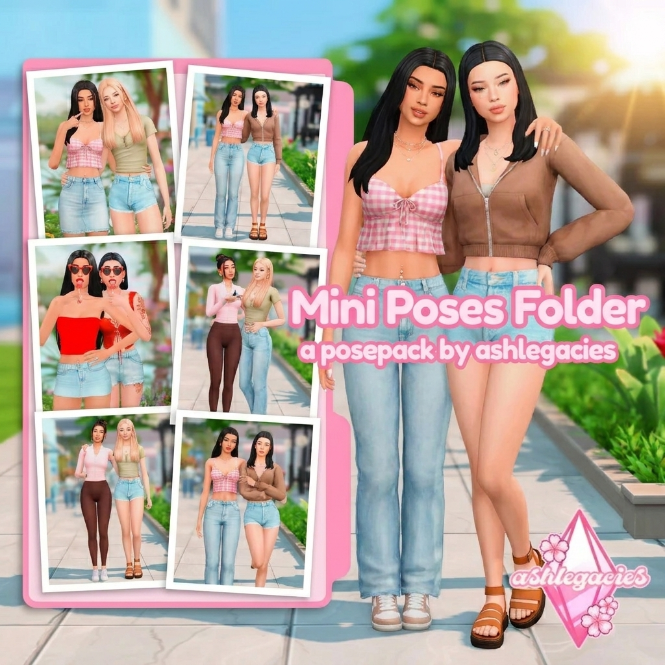
What’s Inside This Sims 4 Poses Folder?
This Sims 4 mini poses folder may include a mix of pose packs for different screenshot styles. Pose folders are useful when you want your Sims to look more natural, expressive, cute, or dramatic in photos.
Inside this folder, you may find poses for:
- Sims 4 solo poses
- Sims 4 couple poses
- Sims 4 best friend poses
- Sims 4 family photo poses
- Sims 4 CAS poses
- Sims 4 selfie poses
- Sims 4 storytelling poses
- Sims 4 aesthetic screenshot poses
- Sims 4 thumbnail and Pinterest poses
Why Download Sims 4 Pose Packs?
Sims 4 pose packs make screenshots look so much better. Instead of using random in-game animations, poses let you control how your Sims stand, sit, smile, hug, pose, or interact with each other.
This is perfect for players who create Sims 4 stories, family portraits, couple edits, lookbooks, Sim dumps, roleplay screenshots, CC previews, YouTube thumbnails, and TikTok content.
What You Need To Use Sims 4 Poses
Most Sims 4 pose packs need a few extra tools to work correctly. Before using pose packs, you may need:
- Andrew’s Pose Player
- Teleport Any Sim
- The pose package files
- Any required accessories listed by the pose creator
Always read the pose creator’s notes because some poses may require objects, accessories, chairs, beds, phones, bags, or other custom content to line up correctly.
How To Install Sims 4 Poses
To install this Sims 4 mini poses folder, download the zip file from the button above. After downloading, right-click the file and extract it first.
Then place the extracted .package files inside your Sims 4 Mods folder:
Documents → Electronic Arts → The Sims 4 → Mods
Open The Sims 4 and go to Game Options → Other. Make sure Custom Content and Mods and Script Mods Allowed are enabled. Restart your game after changing these settings.
Important Pose Folder Reminder
Before adding a pose folder, make sure your pose player and teleport mod are updated. If a pose does not show up, double-check that the files are extracted and placed inside your Mods folder.
If your game starts acting strange after adding new files, remove the folder and test the poses in smaller batches.
You May Also Like
More Sims 4 Poses
Sims 4 Pose Packs
Sims 4 CAS Poses
Sims 4 Couple Poses
Sims 4 Family Poses
More Sims 4 CC Folders