Sims 4 CC Finds | Locs, Outfits, Boots & Summer Clothing Sets
Looking for fresh Sims 4 CC finds? This roundup includes cute hair CC, outfit sets, boots, clothing collections, and summer CAS pieces for your Sims 4 game.
These downloads are perfect for CAS makeovers, baddie Sims, soft glam Sims, Black Sims, summer outfits, lookbooks, Sim dumps, Pinterest screenshots, TikTok edits, YouTube thumbnails, and everyday gameplay styling.
Sims 4 CC Download Links
Siikglobal – Derek Locs
Download Siikglobal Derek Locs
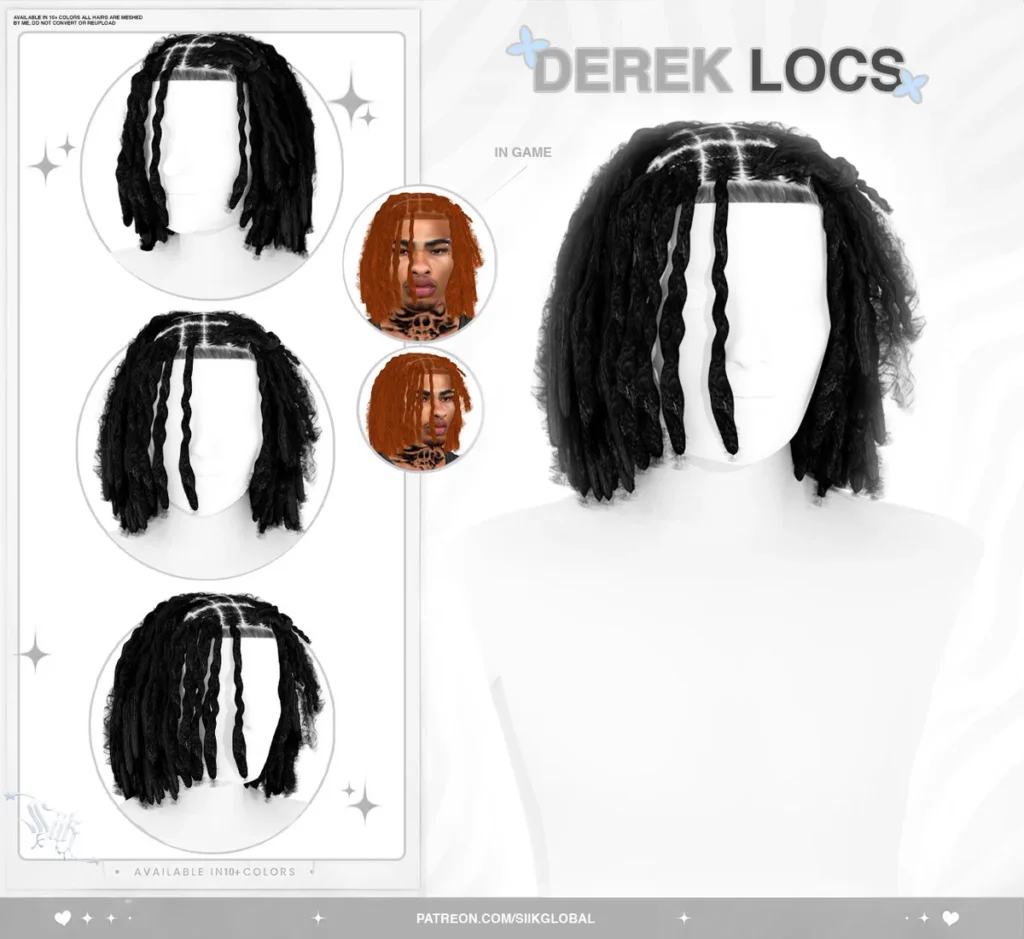
The Derek Locs by Siikglobal are perfect for Sims who need stylish locs, Black hair CC, natural hairstyles, realistic CAS looks, and everyday gameplay outfits.
Heartquake – Leanne Set
Download Heartquake Leanne Set

The Leanne Set by Heartquake is a cute Sims 4 outfit CC find for feminine Sims, stylish CAS makeovers, soft glam looks, and fashion screenshots.
Roxxysim – Knit Ribbon Boots
Download Roxxysim Knit Ribbon Boots

The Knit Ribbon Boots by Roxxysim are a cute shoe CC download for soft outfits, cozy looks, dress styling, and fashion-focused Sims.
Modco – Fallon Set
The Fallon Set by Modco is a stylish Sims 4 CC set for baddie Sims, trendy outfits, CAS makeovers, and everyday fashion gameplay.
Modco – Nova Set
The Nova Set by Modco is perfect for Sims who need modern outfits, stylish CAS clothing, lookbook pieces, and cute everyday fashion.
Backtrack – Summer Bliss Collection Part 4 of 4
Download Backtrack Summer Bliss Collection

The Summer Bliss Collection by Backtrack is great for warm-weather outfits, vacation Sims, beach looks, summer screenshots, and stylish CAS styling.
Why Download These Sims 4 CC Finds?
This Sims 4 CC roundup gives you a mix of hair, outfits, shoes, and summer clothing pieces. It is perfect if you want to refresh your Mods folder with cute CAS items that work for different styles.
Use these downloads for Black Sims, baddie Sims, soft glam Sims, city Sims, summer Sims, fashion screenshots, Pinterest posts, Sim dumps, CAS transformations, TikTok edits, and YouTube thumbnails.
How To Install Sims 4 CC
Download each file from the links above. If the download comes as a zip or rar file, extract it first.
Place the extracted .package files inside your Sims 4 Mods folder:
Documents → Electronic Arts → The Sims 4 → Mods
Open The Sims 4 and go to Game Options → Other. Make sure Custom Content and Mods are enabled. Restart your game, then check Create-A-Sim for your new CC.
Important CC Reminder
Some Sims 4 custom content may require a mesh, expansion pack, or extra file to show up correctly. Always read creator notes when needed.
If something does not show up in CAS or your game loads slowly, test the files in smaller batches so it is easier to find broken or missing CC.
You May Also Like
More Sims 4 CC Finds
Sims 4 Locs Hair CC
Sims 4 Outfit CC
Sims 4 Shoes CC
Sims 4 Summer CC
More CC Finds on Sims4CCFinds