Dogsill CC Hair Folder Sims 4 | Huge Hair CC Download
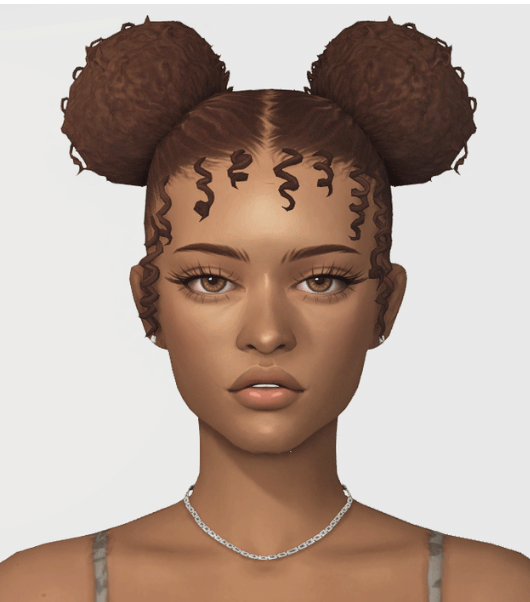
If you love cute Sims 4 hair CC, this Dogsill CC hair folder is a must-have for your Mods folder. This folder is packed with tons of Dogsill hairstyles for Create-A-Sim, including everyday hairs, ponytails, pigtails, buns, ombre styles, headbands, and more.
This Sims 4 hair folder is perfect for players who love CAS makeovers, Sim dumps, aesthetic Sims, Maxis Match hair, soft hairstyles, cute everyday looks, and easy CC folder downloads. Instead of downloading every hair one by one, this folder gives you a large collection of Dogsill hair CC in one place.
What’s Inside This Dogsill Hair Folder?
From the folder preview, this download includes a huge collection of Dogsill package files. The folder shows around 345 items, including hairstyles and accessories such as Aaron Hair, Abba Pigtails, Abigail Hair, Adalene Hair, Adrienne Pigtails, Adrienne Poms, Ainsley Hair, Aislinn Hair, AJ Buns, Alana Hair, Alice Hair, Alore Hair, Aloy Hair, Alpine Hair, Amari Hair, Amelie Hair, Anna Ponytail, Annasophia Hair, Ashley Hair, Aspen Hair, Augusta Hair, Aurelia Hair, and more.
The folder also includes extra pieces like headbands, ombre hair versions, bandana accessories, and multiple hairstyle versions. This makes it a great folder for creating different Sims with unique hair styles without needing to search all over the internet.
Download Dogsill CC Hair Folder
Make sure to unzip the folder first if needed, then place the package files into your Sims 4 Mods folder.
How To Install This Sims 4 Hair CC Folder
To install this Dogsill hair folder, download the file and extract it if it comes as a zip or rar folder. After extracting, place the .package files inside your Sims 4 Mods folder.
Documents → Electronic Arts → The Sims 4 → Mods
After adding the files, open The Sims 4 and make sure Custom Content and Mods are enabled in your game settings. Restart your game, then check Create-A-Sim to see the new hairs.
Why Download This Dogsill CC Hair Folder?
This Dogsill CC hair folder Sims 4 download is perfect if you want more hairstyle options without spending hours collecting each file. Hair CC is one of the easiest ways to refresh your Sims and make them look more unique in CAS.
You can use these hairs for female Sims, teen Sims, young adult Sims, casual outfits, soft girl looks, Maxis Match Sims, Sim dumps, gameplay screenshots, Pinterest pins, YouTube videos, and TikTok CAS edits. With so many hairstyles in one folder, it gives your Sims more personality and style.
You May Also Like
More Sims 4 Hair CC
More Sims 4 CC Finds
Female CC Finds
More Sims 4 Hair Folders
More Sims 4 CC Folders
More Hair CC on Sims4CCFinds